Client App · Android The transfer booking app for agents and corporate clients.
Give your travel agents and corporate accounts their own app: they book transfers on credit with the price and VAT shown up front, follow the driver on the map and keep their invoices and statement in one place.
Your B2B customers book without calling you
The Client app is for the companies that buy transfers from you. You open an account for each travel agent or corporate client in the Agents & corporates module, and their users sign in with the username they receive. They choose airport transfer, point-to-point, hourly or pilgrim ground transport, pick the route, car class, date and passengers, and see the full price with VAT before they book.
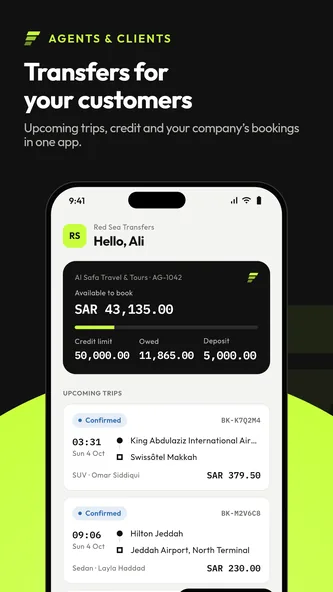
Every booking is made on the account’s credit and can carry the lead passenger, flight number and the customer’s own reference. Once a driver is assigned the booking shows the driver, car and plate, and during the trip the driver appears on a live map with the arrival time. Credit available, amounts owed and the deposit are always visible, with every invoice as a PDF and a full statement. Bookings that need approval wait for the customer’s approver, who approves or rejects them in the app.
What agents and corporate clients get
Book in seconds
Airport transfers, point-to-point, hourly and pilgrim ground transport: route, car, date and passengers, with the price and VAT shown before booking.
Book on credit
Bookings go on the account’s credit, with the lead passenger, flight number and the customer’s own reference.
Know when the driver arrives
Driver, car and plate on every assigned booking, and the driver on a live map with the arrival time during the trip.
Credit, invoices and statement
Credit available, amounts owed and the deposit, every invoice as a PDF and a full account statement.
Corporate approvals
Bookings that need approval wait for an approver, who approves or rejects them from the app.
English and Arabic
The app works in English and Arabic, with a right-to-left layout for Arabic.
How your customers use it
- 01 Get an accountYou create the agent or corporate account and its users in TransferArc.
- 02 Sign inUsers install the app from Google Play and sign in with the username they received.
- 03 BookChoose the trip, see the price with VAT and book on the account’s credit.
- 04 Track and settleFollow the driver on the map, then check invoices and the statement.
Client app screenshots
Transfers for your customers 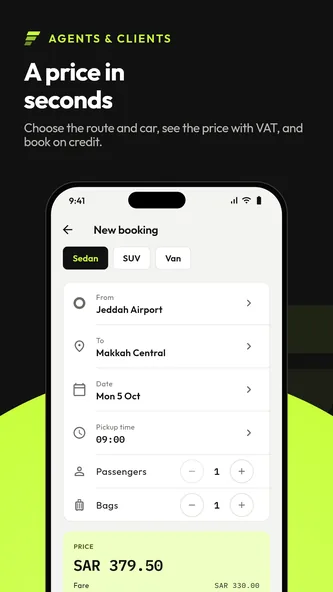
A price in seconds 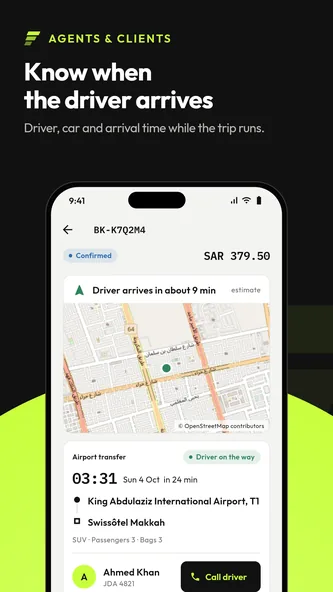
Know when the driver arrives 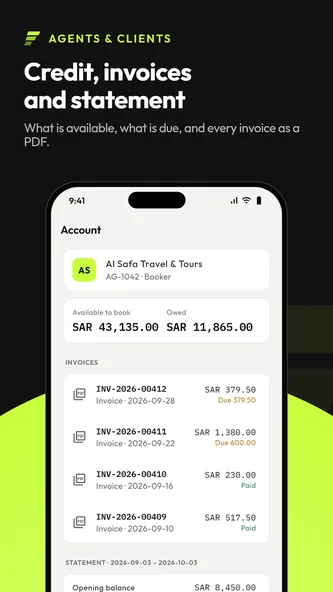
Credit, invoices and statement
For your B2B customers
Any company that books transfers from you on account rather than paying trip by trip.
- Travel agents and tour operators
- Sub-agents
- Corporate clients and their travel bookers
- Hotels and concierge desks
- Event and conference organisers
- Pilgrim and group travel agencies
Get the Client app on Google Play
Your customers install the app from Google Play and sign in with the account you created for them. Want to see how agents and corporates book with an operation like yours? Request a demo.
Frequently asked questions.
What is the TransferArc Client app?
The Client app is TransferArc’s Android booking app for the travel agents and corporate clients of a transport company. They book transfers on credit, track the driver and see their credit, invoices and statement.
Where can I download the Client app?
On Google Play. Use the Get it on Google Play button on this page and install it on an Android phone.
Who can sign in to the Client app?
Users of an agent or corporate account opened by a transport company that uses TransferArc. They sign in with the username they receive from that company.
Can customers pay for each trip in the app?
Bookings are made on the account’s credit. The app shows credit available, amounts owed, the deposit, every invoice as a PDF and the statement.
Which languages does the Client app support?
English and Arabic, with a right-to-left layout for Arabic.