Driver App · Android The driver app for transfer and chauffeur companies.
Your next trip at a glance, a one-slide status update, flight changes, earnings and cash in hand, and an SOS button, in step with dispatch. Location is shared only during trips.
One app between the driver and your control room
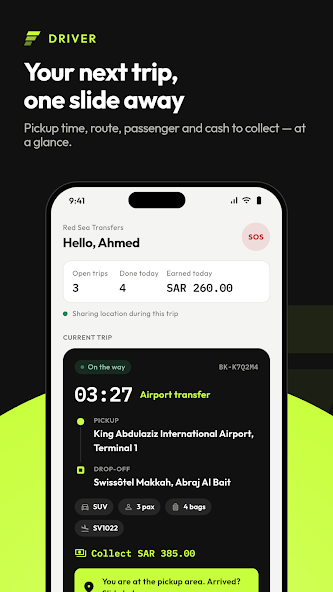
The Driver app is the field side of TransferArc. Drivers sign in with the username their company gives them and see the next trip with the pickup time, route, passengers, luggage, flight and the cash to collect. They call the passenger or open navigation from the trip, and move it on with one slide. Operations sees each change at once on the dispatch board.
It keeps the money clear too: earnings today and this month, cash in hand and what is owed either way, set off at settlement. An SOS sends the driver’s position to operations, and location is shared only while a trip is running and stops when it ends. Dispatch only assigns drivers whose documents are valid (fleet and driver compliance).
Everything a driver needs for a trip
Your next trip at a glance
Pickup time, route, passengers, luggage, flight and the cash to collect, on one screen.
One-slide status
Slide to move the trip forward; dispatch sees every status change at once.
Flight changes
When a passenger’s flight changes, the update reaches the driver.
Call and navigate
Call the passenger or open navigation to the pickup straight from the trip.
Earnings and cash
Earnings today and this month, cash in hand and the balance owed either way.
SOS and privacy
An SOS sends your position to operations. Location is shared only during trips and stops when the trip ends.
From assignment to payout
- 01 Sign inGet the app from Google Play and sign in with the username your company gave you.
- 02 See the next tripDispatch assigns the trip and it shows pickup time, route, passengers, luggage and flight.
- 03 Slide to updateCall or navigate, then slide to move the trip on; operations sees it live.
- 04 Check earnings and cashSee what you earned, the cash in hand and what is owed, ready for settlement.
Driver app screenshots
Your next trip, one slide away 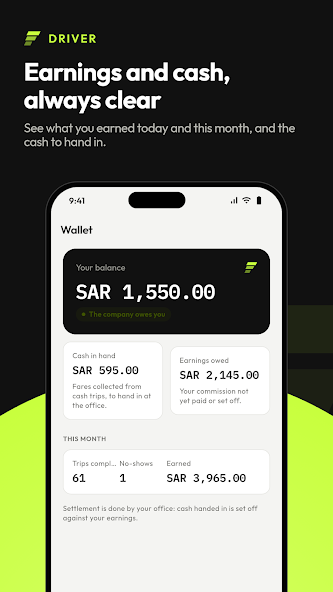
Earnings and cash, always clear 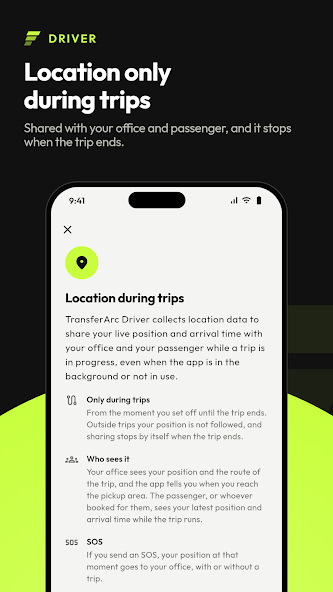
Location only during trips 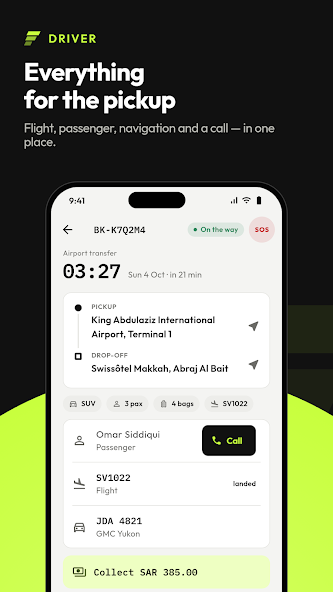
Everything for the pickup
For every kind of driver fleet
Employed drivers and owner-drivers working for transfer, chauffeur and transport companies.
- Airport transfer drivers
- Chauffeur and limousine drivers
- Taxi and private hire drivers
- Shuttle and staff transport drivers
- Tour and coach drivers
- Owner-drivers
Get the Driver app on Google Play
Install the app from Google Play and sign in with the username your company gave you. Want to see it working with your own fleet? Request a demo.
Frequently asked questions.
What is the TransferArc Driver app?
The Driver app is TransferArc’s Android app for drivers. It shows the next trip with pickup time, route, passengers, luggage, flight and cash to collect, lets drivers update status with one slide, and shows earnings and cash in hand.
Where can I download the Driver app?
On Google Play. Use the Get it on Google Play button on this page and install it on an Android phone.
How does a driver sign in?
With the username the company gives them. The app works with your company’s TransferArc setup, so dispatch assigns trips to the drivers your company has added. To see it with your own fleet, request a demo.
When is the driver’s location shared?
Only during trips. Location sharing stops when the trip ends. The app is available in English and Arabic.